Architecture overview
Before you stand up a server, it helps to know the moving parts. There are few of them, and two facts about the server shape almost every decision that follows.
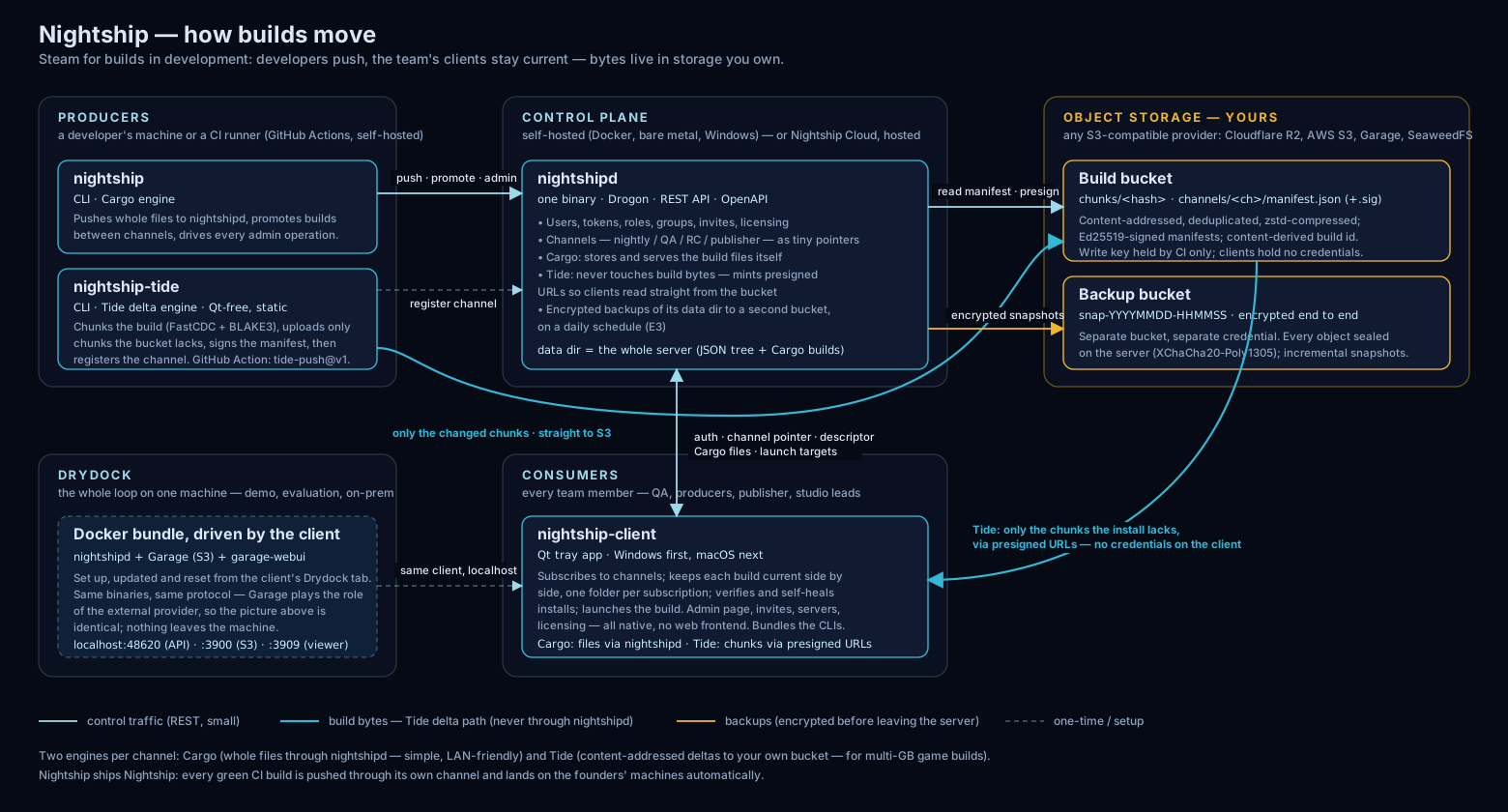
The server: nightshipd
nightshipd is a single self-contained binary. It is the
control plane: it holds users, tokens, channels,
groups, and invites, and it tracks which build each channel
currently points at. It stores all of that — and, depending on the
storage engine, the builds themselves — in one data directory
you choose. Back that directory up and you have backed up the whole server.
It speaks plain HTTP and listens on 0.0.0.0:<port>
(default 8080). That is the whole surface: the desktop client,
the CLI, and CI all talk to the same HTTP API.
How you drive it
Everything a server can do, you can do from either of two surfaces, because both speak that same HTTP API:
- the desktop client’s Admin page — the GUI; and
- the
nightshipCLI — the same operations, scriptable.
They are interchangeable — use whichever you prefer, or mix them. The
guides usually show the CLI because it is precise to write down, but each step
has an equivalent in the Admin UI. The one exception is a handful of
root-of-trust operations —
the first admin and
the license — which use the offline
nightshipd subcommands, run on the server box against its data
directory with no network.
Where builds live
Here is how Nightship distributes builds: the build bytes live in
storage you own, a small uploader (nightship-tide) pushes
builds into it, and nightshipd only coordinates —
it points each channel at the right build and authorizes who may read it, but
never stores or moves the build bytes itself. That is the Tide engine,
and it is the model Nightship is built around.
- Tide (the model) — builds are split into content-addressed chunks and written to your own S3-compatible object storage; only the chunks that changed transfer.
nightshipdstays out of the byte path and just authorizes reads. - Cargo (self-contained) — the server stores whole build files itself, in the data directory. No bucket, nothing else to run — a fit for small or infrequent builds, and the one case where the server holds the bytes.
Which to use, and how to point Tide at storage, is in Storage engines: Cargo vs Tide.
Two facts that shape every deployment
- It speaks plain HTTP, with no built-in TLS. For anything beyond
localhost, put a reverse proxy (Caddy or nginx) in front to terminate HTTPS — see Terminate TLS with a reverse proxy (Caddy). Never expose the server port directly to the internet. - Local access to the data directory is the root of trust. There are no auto-created credentials. A fresh server rejects every request with
401until you mint the first token, and whoever can write the data directory can mint an admin token offline. Keep it owner-only. This is why the first admin is bootstrapped from the box itself — see Bootstrap the first admin.
Roles
Every token belongs to a user, and every user has one role:
- admin — full control: users, tokens, channels, groups, invites, and builds.
- publisher — may upload, finalize, and promote builds, but only to the channels on its allow-list. This is the safe identity for CI: a leaked publisher token can touch only its own channels, never users or admin state.
- member — may follow channels and download the builds they are entitled to.
Ways to run it
The same binary runs several ways. Pick the one that fits:
- Drydock — a full local Nightship (server and storage) in Docker, one click, for trying and demoing.
- Run nightshipd with Docker — the recommended way to run a real shared server, via Compose or the Docker Desktop GUI.
- Run nightshipd bare-metal (systemd) — the same server straight from the binary, no containers.
- Quick local server on Windows — the bundled server binary for a fast local test.