Everything a team needs to move builds.
Built by game developers who were tired of “which build is current?” — designed for any team that ships desktop software to itself.
Channels, like branches for builds
Push to nightly, promote to qa, roll back with one command. A channel is a pointer to an immutable build — promoting and reverting are instant, atomic, and auditable.
Side-by-side installs
Follow as many channels as you like — nightly, RC, and last-known-good coexist in separate directories. Reproduce “broke between build 44 and 47” without re-downloading a thing.
One button: Run
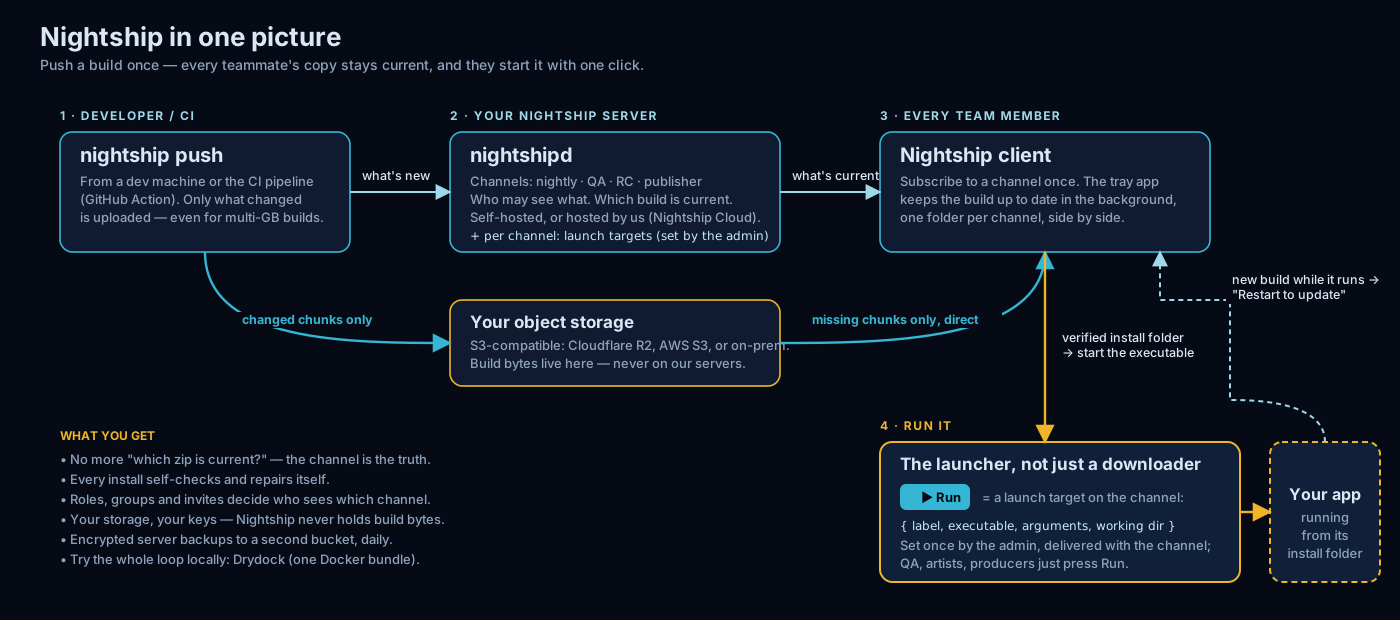
Nightship isn't just the pipe — it's the app testers open to launch the build. Admins define per-channel launch targets (the button label is the command — “Run”, “Run QA Windowed”); users add their own flags, pin favourites, and get a one-click “Restart to update” when a new build lands.
A quiet client in the tray
Nightship lives in the system tray and just works: staged downloads, atomic swaps, and lock-aware updates that wait politely while your build is running — then finish themselves. Your team sees a notification, not a workflow. Windows today, with a macOS client on the way.
Drops into your CI/CD
Integration is one CLI line in any pipeline — GitHub Actions, Jenkins, TeamCity, GitLab: nightship push ./out --channel nightly. Token auth, --json output, honest exit codes. No plugins to install, nothing to babysit.
Teams, groups & invites
Assign channels to groups; members' machines subscribe automatically. Onboarding a tester is one invite code: nightship join and their machine follows the right builds.
Self-host anywhere
One self-contained server binary. A workstation, a LAN box, your own VPS — no database server, no cloud dependency, air-gap friendly. Your builds never have to leave your infrastructure.
CLI-first, API-always
Every feature is a CLI verb against a documented OpenAPI interface — --json everywhere, honest exit codes, CI-friendly tokens. The UI is a convenience, never a requirement.
Signed & secure
Signed binaries, hashed credentials, role-based access, single-use invites. Scoped CI tokens keep pipeline credentials on a leash — a leaked one can never touch users or other channels. Every download hash-verified before it is activated.
Two engines: nightship-cargo & nightship-tide
Every channel picks how its builds travel. nightship-cargo moves whole files — simple and rock-solid, the default. nightship-tide adds content-defined chunking and global dedup, so successive builds move in megabytes, not gigabytes: only the changed chunks travel, straight from your own object storage. Same channels, same client — switch per channel.
And the app your team opens to run it.
Distribution is the plumbing. The Run button is the daily surface — the reason testers, QA, and artists open Nightship every day, not a background task they forget about.
- Set up once, by the team. Admins attach launch targets to a channel — the button's label is the command itself: “Run”, “Run QA Windowed”, “Run Editor”. No more hunting for the right executable in a folder of hundreds.
- Your flags, their defaults. Layer your own arguments around the admin's — or ignore them entirely. Everyone runs the same build the same way, without memorising settings.
- A personal Run shelf. Pin the targets you use most into Favourites, across every channel you follow.
- Update without the wait. Because Nightship launched the app, it knows when a newer build is ready — and turns a locked update into a one-click “Restart to update”.
How it works
Three verbs. That's the whole mental model.
CI pushes the build
nightship push ./out --channel nightly — from your pipeline or your terminal. Builds are immutable and finalized atomically; no torn syncs, ever.
You control the channels
nightship promote qa --from nightly when QA should get what nightly proved. Rollback is the same command aimed at an older build.
Machines stay current
Subscribed machines notice, download to staging, verify, and swap — automatically. A tray notification is the only thing your team sees.
Set up in minutes, for admins and users alike
No database to install, no cloud account to create, no onboarding meetings.
Start a server
One self-contained binary: nightshipd. First start prints your admin token. A workstation or any LAN box is enough.
Invite your team
nightship invite create andrea --groups team — one single-use code per person, shared however you already chat.
They join — done
nightship join <server> <code> — their machine subscribes to the right channels automatically, and the tray client takes it from there. Forever.
Hosted by us, or entirely on your premises
The same product, wherever it serves you best — and moving between the two is copying a directory, in either direction.
Nightship Cloud — coming soon
We’ll run the servers, you push builds — zero ops, zero maintenance, for teams who want build distribution, not infrastructure. Landing during early access; on-premises is available today. Want Cloud early? Ask us.
Fully on-premises
One self-contained binary on your own hardware — office LAN, private VPS, even air-gapped networks. Nothing phones home. Built for studios whose builds must never leave the building.
Your data is always yours
No lock-in, by construction: your entire account exports as a plain folder that a self-hosted server reads directly. Leave our cloud — or join it — whenever you choose.
$ nightshipd --data-dir /srv/nightship
nightshipd 0.3.0
  listening on http://0.0.0.0:8080

$ nightshipd token create andrea --user andrea
Token created — shown once, stored only as a hash.

$ curl -s https://builds.example.com/api/docs
# every server documents its own API
Ready to run your own? The guides
walks through a quick local setup on Windows and a full Linux deployment
behind HTTPS. The Linux server ships as an
official Docker image —
ghcr.io/nightship-io/nightshipd,
public and ready to pull.
Want the whole picture first? The Nightship white paper (PDF) lays out the architecture, the nightship-cargo and nightship-tide engines, the security model, and how Nightship compares to the alternatives.
Get started today.
Nightship already ships Nightship — every new build of the product reaches our own machines through a Nightship channel, automatically.
We are our own first customer.
Nightship is in early access and ready to use today: download the client and follow a channel, or self-host your own server in one command.
Windows client today, macOS on the way — self-host free on storage you own. Building something ambitious? Tell us about your team.